

cURL
Push Payments
Standard Checkout
The Standard Checkout is a managed OneKhusa service that simplifies the checkout process for accepting payments to be made by third party systems supported through:
- VISA and MasterCard card payments: We only support international card payment. Refer to test cards page.
- Mobile Money (STK Push / USSD Prompt): Refer to test accounts page.
- Bank Transfer (Push payments): The feature coming soon. Refer to test accounts page.
POST
cURL
In order to accept push/card payments through the managed checkout page, the process is as follows:
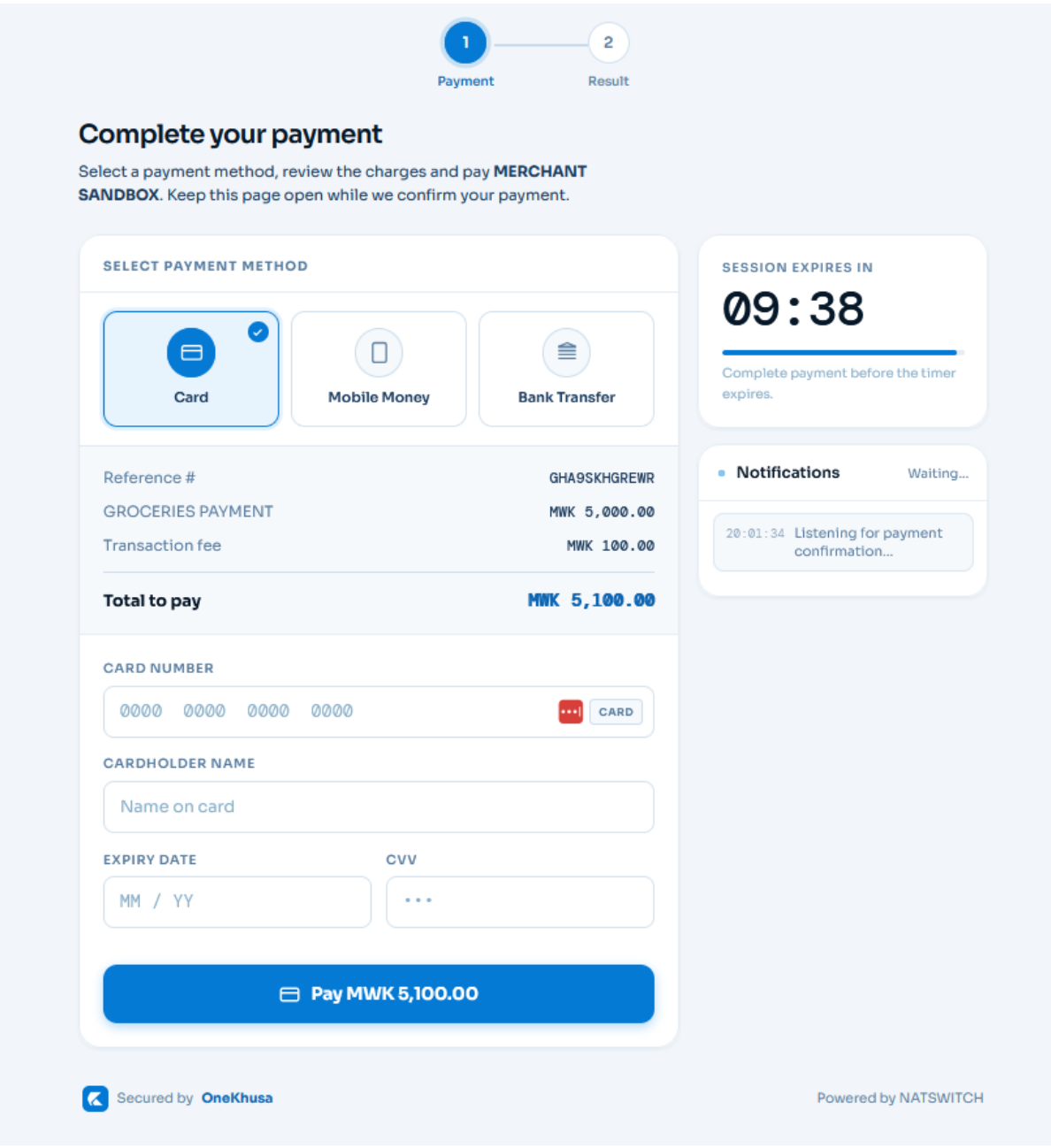 Figure 1: Standard Checkout
Your initiated payment transaction will be displayed as illustrated in figure 1 above. Under the card payment method tab, the customer enters card information to finalize the payment. Upon clicking PAY, the customer may be prompted by 3DS authorization through OTP based on the card setup. Once payment is successful and received, the customer is redirected automatically to your application.
Figure 1: Standard Checkout
Your initiated payment transaction will be displayed as illustrated in figure 1 above. Under the card payment method tab, the customer enters card information to finalize the payment. Upon clicking PAY, the customer may be prompted by 3DS authorization through OTP based on the card setup. Once payment is successful and received, the customer is redirected automatically to your application.
- Your system initiates a checkout payment request
- On successful payment request, redirect to the hosted checkout page
- Finalise the payment by choosing the payment method
- Update the payment status in your system through webhook notification
- The checkout service redirects to your system to mark the process as successful
1. Initiate Payment Request
This step allows your application to initiate the payment request and waits for the successful response to redirect to OneKhusa hosted checkout service. Take note that this endpoint requires access-token for authentication.2. Redirect To Checkout
Once your application receives a successfully initiated payment response, redirect it to the OneKhusa checkout page using the URL generated under thecheckoutUrl property.
Figure 1: Standard Checkout
Your initiated payment transaction will be displayed as illustrated in figure 1 above. Under the card payment method tab, the customer enters card information to finalize the payment. Upon clicking PAY, the customer may be prompted by 3DS authorization through OTP based on the card setup. Once payment is successful and received, the customer is redirected automatically to your application.
3. Simulate Card Checkout Payment
To simulate a card payment made by a customer through the managed checkout service, refer to the Test Cards page.Authorizations
Bearer authentication header of the form Bearer Token, Where accessToken is the access token used to authenticate the request.
Response
200 - application/json
Successful initiation of checkout request
Unique reference number provided in the request.
Example:
"SRN123456789"
Merchant account used for the transaction.
Example:
12345678
Generated transaction ID used for the checkout session.
Example:
"GENERATED_TRANSACTION_ID"
Generated hosted checkout URL used to redirect the customer to the payment page.
Example:
"GENERATED_CHECKOUT_URL"