The OneKhusa User-Initiated Account Top-up Pathway allows merchants to prefund a merchant account directly from their own mobile money menu or banking application for business operations, merchant floats etc. Because the transaction originates outside the merchant’s system, OneKhusa detects the inbound payment and asynchronously notifies the merchant system to update the account prefunded balance.
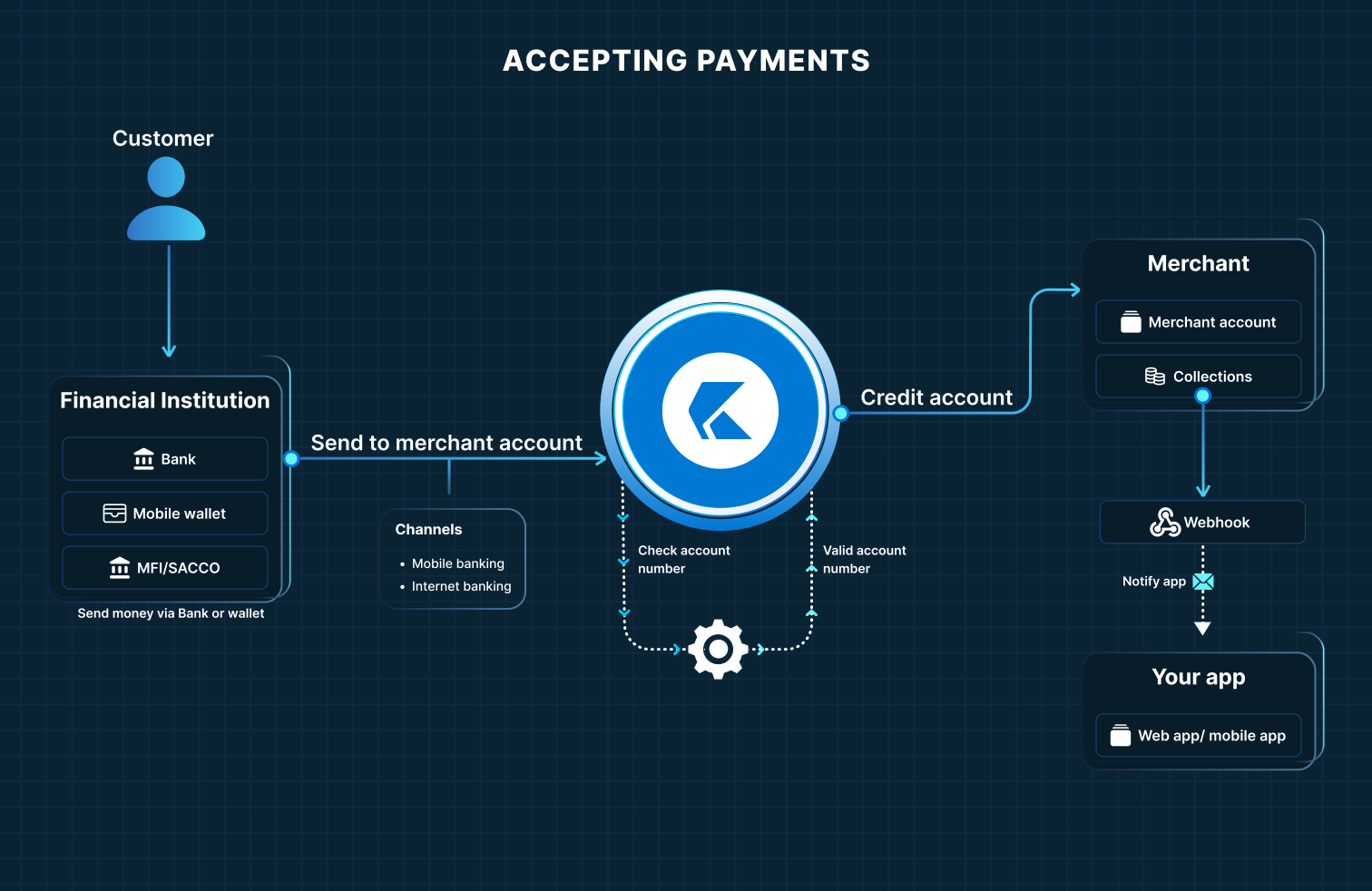
Execution Workflows
1. Mobile Money Top-up
-
Target Use Case: User-driven prefunding via Airtel Money, TNM Mpamba without merchant application prompts.
-
Technical Process: The user opens their Mobile Money menu on their handset to transfer funds to merchant account and authorizes with their PIN. OneKhusa receives the payment settlement notification, records the collection transaction, and dispatches a
payment.success event to the merchant system.
2. Bank Transfer Top-up
-
Target Use Case: High-value direct bank app transfers into OneKhusa merchant accounts.
-
Technical Process: The user logs into their mobile banking app or internet banking portal and transfers funds to a dedicated OneKhusa merchant account number. OneKhusa captures the inbound transfer in real time and alerts the merchant backend via webhook.
Supported Webhook Events
Because the transaction is initiated by the end-user outside the merchant application, webhooks serve as the sole trigger for updating merchant account balances through OneKhusa:
-
payment.success : Dispatched immediately when an inbound payment from a mobile money wallet or bank app is received and settled. Your merchant system must listen to this event to credit the account prefunded balance. Refer to the Account Top-up Webhook for the event payload.
-
payment.reversed : Dispatched if an inbound payment transfer is subsequently reversed by the operator or bank (e.g., due to duplicate processing or fraudulent deposit reversal). Your system must debit or adjust the targeted account balance accordingly. Refer to the Account Top-up Webhook for the event payload.
How to Test Account Top-up
To simulate the account top-up in sandbox environment, you can use the API directly or the merchant portal. A collection webhook will be required for the developer to process any incoming request after a simulation is initiate. To test accept payment do the following:
- Log in to your OneKhusa account
- Go to Test Your Integration → Simulate Account Top-up
- Choose the merchant account to test payment
- Select Make Payment
- Specify the top-up amount and the Bank/MNO that the payment should originate from
- Select Topup Account to send the payment
- Once the payment is received, a successful webhook is sent to the merchant system.
Implementation Guidelines
-
Strict Webhook Idempotency: Process
payment.success events using the unique OneKhusa’s transactionReferenceNumber to ensure balances are never credited twice if webhooks are re-delivered.
-
Reversal Handling Logic: Upon receiving
payment.reversed, place an immediate account debit or hold on the prefunded merchant account to reconcile the reversed transaction in your system.

